
Debt Management & Collections System Solutions
With editions from Xpress to Corporate with the choice of cloud or premise deployment, Collect! debt recovery software offers the modular, scalable,
configurable package, self-serve tools and integrations you need to automate your workflow. Move easily to larger editions or newer versions
of Collect! with all your date, configurations and customizations in place.
Collect! Cloud-Based Versions
A cloud-based entry level version of the regular Collect! receivable management software application for up to 5 concurrent users and 2,500 accounts. All modules are included in cloud-based versions of Collect! Check out the Cloud-Based Pricing page for feature details.
A hosted desktop Collect! receivable management application for the growing business with up to 10 concurrent users and up to 10,000 debtor accounts. Entrepreneur has all the standard features and flexibility of the larger Collect! applications at a small-business price. All modules are included in cloud-based versions of Collect! Check out the Cloud-Based Pricing page for feature details.
A hosted desktop Collect! receivable management application for the growing business with no restriction on concurrent users and up to 100,000 debtor accounts. Professional has all the standard features and flexibility of the largest Collect! application. All modules are included in cloud-based versions of Collect! Check out the Cloud-Based Pricing page for feature details.
A hosted desktop Collect! receivable management application for the growing business with no restriction on concurrent users and up to 500,000 debtor accounts. Professional Plus has all the standard features and flexibility of the largest Collect! application. All modules are included in cloud-based versions of Collect! Check out the Cloud-Based Pricing page for feature details.
A hosted desktop Collect! receivable management software application for the established business with no restriction on concurrent users or debtor accounts. All the standard features and flexibility of the full Collect! application. All modules are included in cloud-based versions of Collect! Check out the Cloud-Based Pricing page for feature details.
- Access from any internet connection 24/7 with only a few clicks
- Faster and easier implementation of Collect!
- Increase business process efficiency
- Reduce or eliminate upfront costs for additional/supporting systems such as servers and networks
- Eliminate costly resources to maintain servers, create back-ups and disaster recovery plans
- Automatic software updates and upgrades without additional cost
- Automatic Collect! membership for Help Desk support, access to the Member Center and highly discounted technical services
- Opportunity to focus on your core business and NOT on managing your hardware and systems
- Looks and acts exactly like Collect!’s premise version
- Highest level of security maintained through a number of industry standard measures
Xpress, Entrepreneur, Professional, Professional Plus, Corporate
Windows
Windows 7 and higher already comes preloaded with Remote Desktop Connection. Ensure that you are running Windows Updates for Windows and installed devices like printers. You will also need a high-speed internet connection.
MacOS
MacOS X with the Microsoft Remote Desktop app installed from the App Store. You will also need a high-speed internet connection.
iOS
iOS with the Microsoft Remote Desktop app installed from the App Store. You will also need a high-speed internet connection (Wi-Fi recommended).
Linux
Linux with any Windows Compatible Remote Desktop application installed. You will also need a high-speed internet connection.
Collect! Premise-Based Versions
A desktop Collect! debt recovery software application for the growing business with up to 10 concurrent users and up to 10,000 debtor accounts. All the standard features and flexibility of larger Collect! applications. Check out the Premise-Based Pricing page for feature details.
A desktop Collect! debt recovery application for the growing business with no restriction on concurrent users and up to 100,000 debtor accounts. All the standard features and flexibility of the largest Collect! application. Check out the Premise-Based Pricing page for feature details.
A desktop Collect! debt recovery application for the growing business with no restriction on concurrent users and up to 500,000 debtor accounts. All the standard features and flexibility of the largest Collect! application. Check out the Premise-Based Pricing page for feature details.
A desktop Collect! debt recovery software application for the established business with no restriction on concurrent users or debtor accounts. All the standard features and flexibility of the full Collect! application, all modules included and the capacity for multiple production databases. Check out the Premise-Based Pricing page for feature details.
- Same great software, just on your own server
- No dependency on an internet connection
- Allows more seamless integrations with other on-premise systems like dialers
Server
| Item | Minimum | Recommended |
|---|---|---|
| Operating System | Windows 2019 Server | Windows 2022 Server or Higher |
| Processor | Dual-Core 2.0 GHz or higher | Quad-Core 2.0 GHz or higher |
| Memory | 4 GB | 16 GB |
| Hard Drive Size | 30 GB for Collect! data only (Dedicated Hard Drive Recommended) | 500 GB for Collect! data only (Dedicated Hard Drive Recommended) |
| Database Engine | Microsoft® SQL Server 2019 | Microsoft® SQL Server 2022 or Higher |
| Network | 100/1000 Ethernet | 100/1000 Ethernet |
| Daily Backup | Another Hard Drive | Offsite |
| Power | UPS – 1 hour | UPS – 1 hour |
| Optional Additional Software | OpenOffice (Free) | Microsoft Office |
| Optional Additional Software for Import / Export | Notepad++ – https://notepad-plus-plus.org/ (Free) | Notepad++ – https://notepad-plus-plus.org/ (Free) |
Workstation
| Item | Minimum | Recommended |
|---|---|---|
| Operating System | Windows 7 Professional | Windows 10 Professional |
| Processor | Dual-Core 2.0 GHz or higher | Quad-Core 2.0 GHz or higher |
| Memory | 4 GB | 16 GB |
| Power | UPS – 15 minute minimum | UPS – 15 minute minimum |
| Optional Additional Software | OpenOffice (Free) | Microsoft Office |
| Optional Additional Software for Import / Export | Notepad++ – https://notepad-plus-plus.org/ (Free) | Notepad++ – https://notepad-plus-plus.org/ (Free) |
Built to Help You Grow
Secure and Scalable
Compliant
Highly Configurable
Powerful Features
Flexible Automations
Bulk Data Imports
Reports and Letters
Help Desk and Documentation
Grow Your Business with Collect!
Automate and manage your collections workflow with Collect!
From adding account assignment and first contacts during bulk imports to auto-generating month end statements and checks, Collect!’s many configuration options and automations will let you create the workflow you need to grow your business.
- Collect! is used by 1st party creditors for their accounts receivable and pre-collection work, by 3rd party collection agencies and debt buyers as their system of record. Collect! enables infinite client layering and portfolio, client or department level reporting.
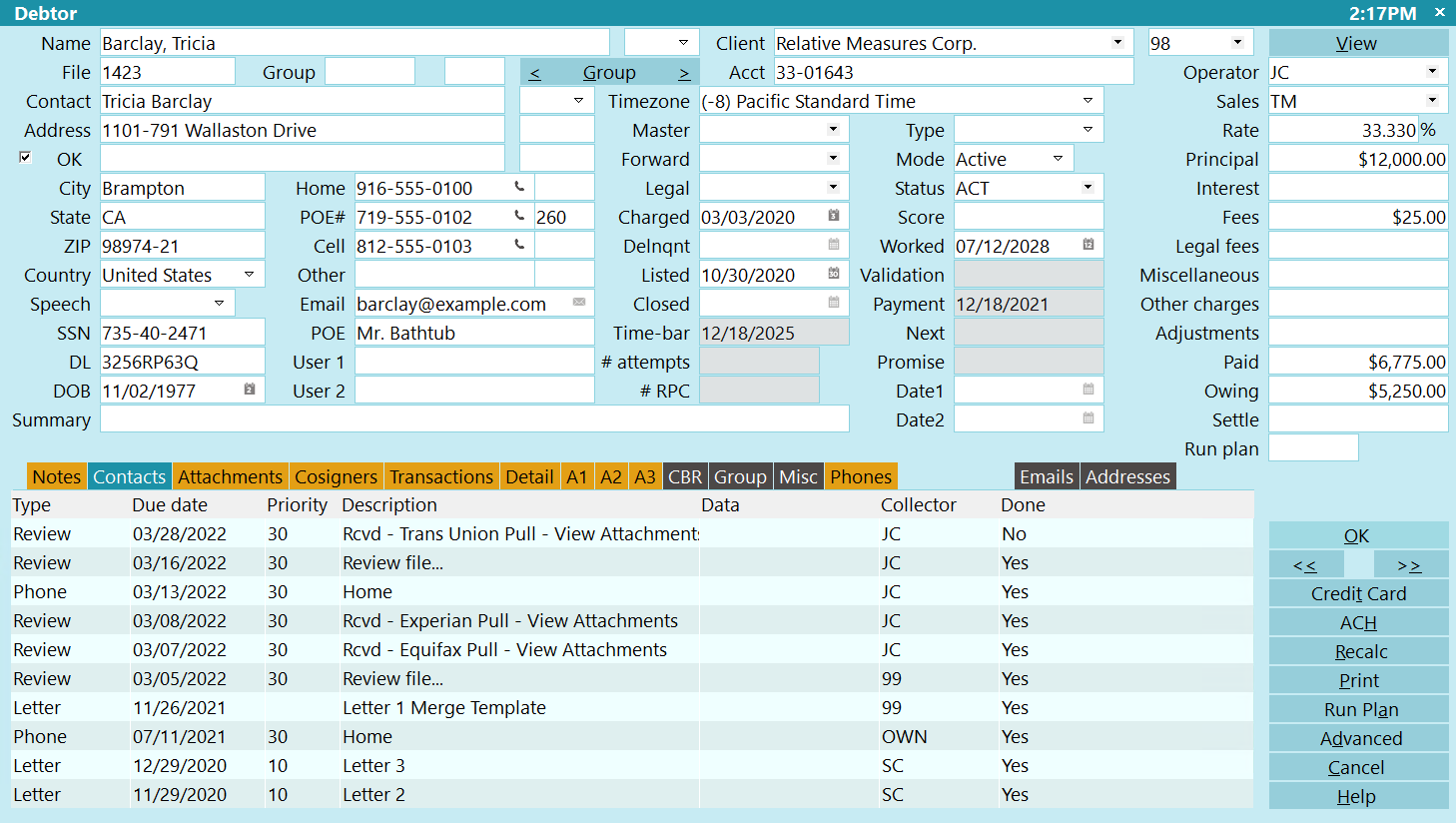
- Collect! manages and stores all account records, financials, letter and contact schedules, attached files, personnel information and a complete history of events.
- Collect! offers an API, many partner integrations and partner tools to automate data exchanges with other service providers.
- Collect! enables owners/managers to set the global controls and create the workflow they want. Collect! provides each collector with a Work Queue that acts as a configurable hub for their collection activity.
- Collect!’s latest Version 13 provides a new suite of features, including global controls, workflow audits and stock Model Validation Notices for CFPB Reg F compliance.
- Collect! is the flexible, configurable, secure, scalable, full-featured software solution you need to take your business forward.
Highly Configurable
- Collect! comes with default settings to run a standard collection agency.
- Collect!’s pre-configuration for standard operations enables newer or smaller businesses to get up and running quickly with only essential configuration of company details, access rights, global controls and individualizing stock letter templates.
- Collect! users can re-configure functions as much or as little as they like to suit their particular workflow requirements using Collect!’s extensive Help documentation and technical support. In addition, established, more complex or larger companies can modify stock report and letter templates, and build completely custom reports, letters, imports, data exchanges, action plans, scheduled batch processes and additional automations to automate and standardize routine decision making, save operator time and automate interactions with other systems.
- With Collect! you can use as few or as many features as you want. Smaller companies can choose not to use certain functions until they are larger, knowing that the system will accommodate all their needs now and later. Larger companies have all the features and assistance they need to create the complex workflows they want and the ability to configure those features for their needs.
Secure and Scalable
- Switch easily between cloud and premise deployments
- Choose between editions from Xpress to Corporate
- Retain data, configurations and customizations when you move to a larger edition or a later version of the software
- Add and drop seats at will
- Add and drop modules at will
- Add and drop integrations at will
- Extract your entire database or selected clients with the click of a button
- Secure data transfer
- 64 bit computing
- Multiple database option
- MS SQL database
Powerful Features
- Flexible access rights
- File attachments
- Credit Bureau Reporting
- Emails and texts
- Use for sales and operations
- Consumer & client portals & legal client access
- Permanent use of a demo database
- Inventory Management Tool
- Reporting dashboard & report utility
- Currency and language options
- API & webhooks via XML data pump
- Web socket client to server communication
Compliance
- Global rule sets
- Opt-in/opt-out tracking
- Dedicated data fields and screens
- Stock Model Validation Notice letters
- Workflow analysis
Flexible Automations
- Operator work queues
- Contac plans for action sequences
- Payment posting automations
- Scheduled or ad hoc batch processes
- Integrations and file exchanges
Data Imports
- Default import using prescribed file layout
- Custom import using client or vendor file layouts
- Re-use import maps indefinitely unless layout changes
- Auto-increment client and account numbers on import
- Define starting account numbers on import
- Add flat fee on import
- Add percentage interest and commission on import
- Distinguish between new and updated accounts
- Configure fields to apply formatting rules to new data
Reports & Letters
- Select from over 100 stock reports and letter templates
- Modify stock reports, individualize letter templates
- Choose from many report output options
- Choose from many letter output options, including email
- Query your SQL Server database directly with any reporting tool
- Create letter header and footer file to cascade to all letters
- Create letters in RTF and store in letter history
- Create letters in Mail Merge but not stored in history
- Create letter files for letter service
Security
- Secure data transfer
- Column and database level encryption and redaction
- Granular access controls
- Multi-factor authentication options
- Automatic logging and backup
- Multiple security levels
- HIPAA, SOC2 Type II
- Secure work environment
- Business continuity, disaster recovery, incident response plans
Training, Resources & Support
- Orientation and training included
- Live Help Desk support
- Extensive online documentation
- Detailed documentation indexing
- Documentation accessible from system and online
- Large set of training videos
- Technical services
- In-house onboarding by experienced specialist technicians
- User conference
